RPX Discord Rich Presence
Give your players a professional Discord activity display that automatically updates while they play on your server. This script shows live in-game information directly on a player’s Discord profile, helping promote your server and making it look far more polished.
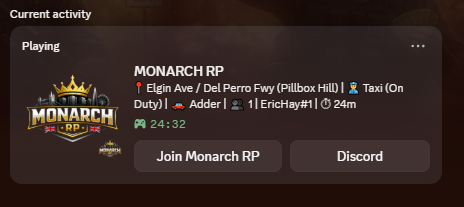
Players’ Discord status will automatically update with useful information while they are in your city.
Features include live street location, job and duty status, character name display, current vehicle detection, live player count, session play time tracking, clickable Discord buttons and a lightweight optimized design. The script runs entirely client side and has minimal performance impact.
Example Discord Status
📍 Grove St / Davis Ave (Strawberry)
👮 Police (On Duty)
👤 John Smith
🚗 Police Cruiser
👥 42 Players
⏱ 1h 12m
Players can also click buttons directly from their Discord profile to join your server or open your community Discord.
Framework Compatibility
This script works with Qbox, QBCore, ESX Legacy and even standalone FiveM servers without a framework.
Fully Configurable
Server owners can easily customise job icons, Discord buttons, Rich Presence assets, update intervals and display text. Everything is controlled through the config.lua file making it easy to adjust for any server.
Why Use Discord Rich Presence
Discord Rich Presence helps advertise your server automatically through players’ Discord activity, makes your server look more professional, increases server visibility and helps grow your community. Every player becomes free advertising for your server.
Installation
Place the resource inside your resources folder, add ensure rpxrichpresence to your server.cfg, add your Discord Application ID inside the config file and restart the server.
Support
Discord: https://discord.gg/hZDMAB8n4B
FREQUENTLY ASKED QUESTIONS
TOP CUSTOMER
RECENT PAYMENTS