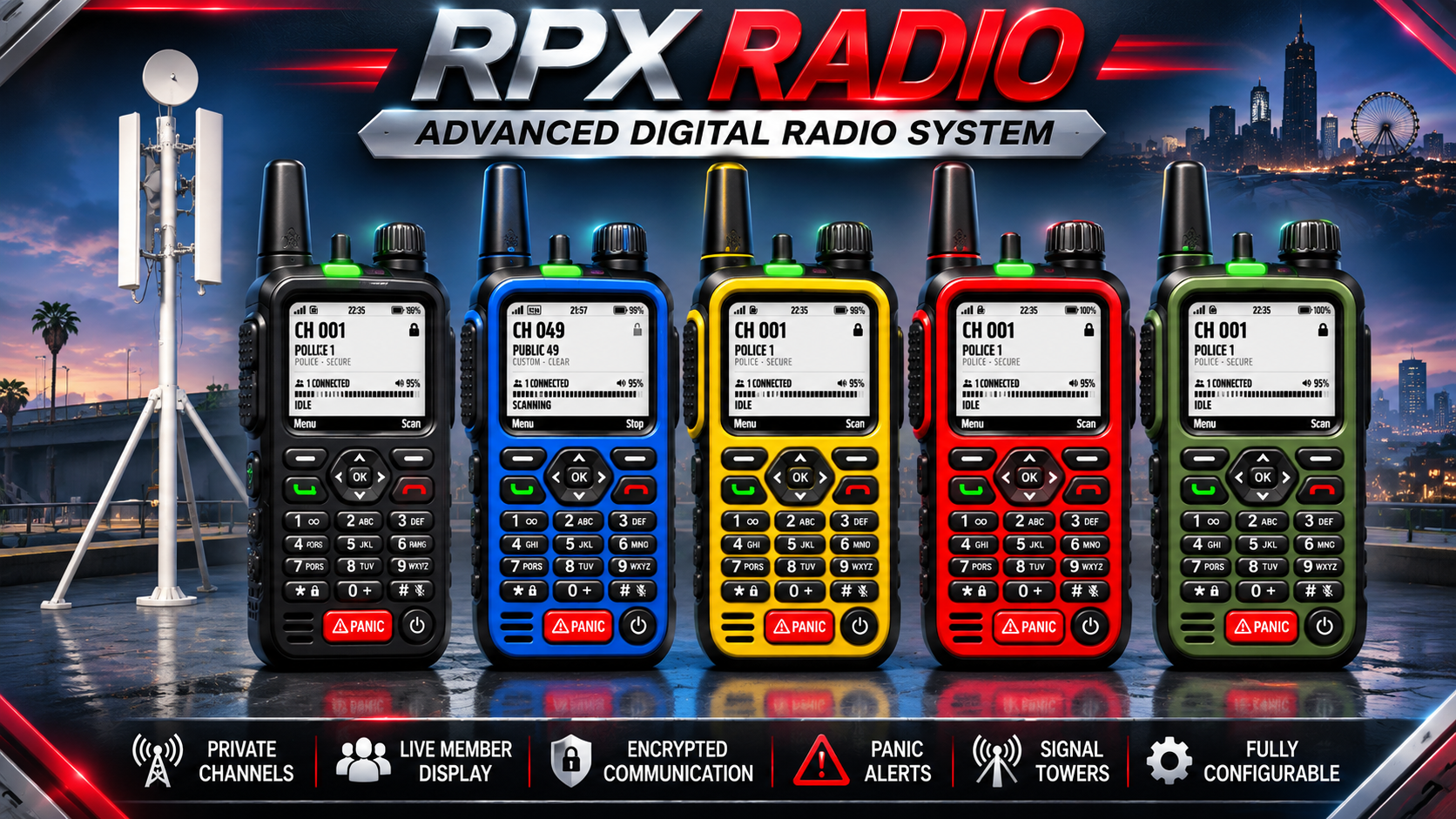
📻 RPX Radio — Digital Handheld Radio
By RPX (Roleplay Xclusive)
A realistic digital handheld radio for your FiveM server. Players click real buttons on a physical radio, hold a 3D radio in their hand in their radio's colour, and talk through your voice resource with real audio. It comes with private channels, panic alerts with live GPS, signal towers, jammers, battery charging and private one-to-one calls.
🎨 The Radio
5 radio colours: Black, Red, Blue, Yellow and Olive Green, each with its own 3D prop held in the hand
Working physical controls: keypad, D-pad, soft keys, channel knob, side push-to-talk, volume keys, power and a red PANIC button
White display by default, with an optional dark display
Live screen with channel, signal bars, battery, time, volume, encryption, connected members and status
Phone-style animation: hold it like a phone, raise it to your ear to talk
Organisation boot screens per job or gang (for example LSPD / SECURE NETWORK)
Button tones, power on/off sounds, incoming transmission beeps and optional static
📡 Channels
Job and gang channels with minimum grades and on-duty checks
Public channels 10–50 anyone can join
Private channels owned by players: perfect for gangs, businesses and friends
Owners and managers can invite nearby or offline players, remove members, set passwords, member limits, lock the channel and transfer ownership
Private channels can never be joined just by typing the number
Scanning with a priority channel, favourite channels and direct channel entry
Full admin menu to create, edit and delete any channel
👥 Member List Overlay
Clean white-text list of who's on your channel, with no box by default
Shows who's talking, plus BUSY / N/A / CALL tags
Each player chooses callsign, name or both, text size, position and an optional background
🚨 Panic Button
Cancellable 3-second countdown to stop accidental presses
Alerts everyone on your channel and the jobs you choose (e.g. police and ambulance)
Live GPS blip, an automatic waypoint that follows the officer, and acknowledgements
Panic history, cooldowns and per-job settings
Built-in support for ps-dispatch, cd_dispatch, qs-dispatch, rcore_dispatch, core_dispatch, tk_dispatch and aty_dispatchv2
⭐ Extras
Status buttons: Available, Busy, Not available
Private one-to-one calls between radios
Remote radio kill: disable a lost or stolen radio by its serial number
Signal towers: place your own towers in game with a placement tool; signal bars show how close you are, and out of range means no coverage
Radio jammer: a placeable prop that blocks radios nearby; police can seize it
Battery system: battery drain, swappable batteries, and used batteries recharged at chargers with the third eye (ox_target or qb-target)
Signal loss underground, indoors and in configurable zones
Discord logging for panics, remote kills, channel changes, jammers and towers
🔒 Secure by Design
Every channel join, invitation, edit and panic is checked on the server
Unique radio serial numbers block duplicated radios
Removing the radio from your inventory disconnects you
With pma-voice, the voice resource itself refuses players who aren't allowed on a channel
🧩 Compatibility
Frameworks: QBCore, Qbox (qbx_core), ESX Legacy
Voice: pma-voice (recommended), SaltyChat, mumble-voip, TokoVOIP, plus a custom adapter for other voice resources
Inventories: ox_inventory, qb-inventory, lj-inventory, ps-inventory, qs-inventory, core_inventory, ESX / QBCore built-in
Target: ox_target or qb-target (optional; players can press E instead)
Some features depend on what your voice resource supports. Server-side channel protection and radio volume are fully supported on pma-voice and SaltyChat.
📦 Requirements
ox_lib
oxmysql
OneSync
Game build 2944 or newer (for the jammer prop)
⚙️ Easy Setup
Framework, inventory and voice resource are detected automatically
Database tables are created automatically
Item definitions for every inventory and all item images included
One clean, fully commented config file
Config, translations and framework / inventory / voice bridges stay open to edit
💬 Support & updates: discord.gg/EdYPhrHGr7
FREQUENTLY ASKED QUESTIONS
TOP CUSTOMER
RECENT PAYMENTS